garynbcDiary · 日记

Hard reset samsung wave 8500, secret code


*#1234# - Shows Firmware version.
*#197328640# - Internal Settings
*2767*3855# - Hard Reset

Please be careful while using these codes. Changing values without knowing what they are might make your phone unstable.

*#197328640# - Secret Menu.
*#0228# - Battery Info

*#0*# - LCD test

*#1111# S/W Version
*#1234# Firmware Version
*#2222# H/W Version 

*#197328640#

This code can be used to enter into Service mode. You can run various tests and change settings in the service mode.

For increasing music volume:

Type *#197328640#
Click the button 5 ( Audio )
Click the button 2 ( AP, Volume Config)
Click on the button 2 (EAR Config )
Click the button 1 (volume PM) - to increase the volume of music files or the 5 key (FM Radio volume ) - Radio
We can see the 7 lines (0-6 ) , we can increase the value of
all lines (these are the lines that define the level at each
support ), you can change any of them or increase only
last value of 58dB to 75dB and 100db max .

To enter double digit, for 0 line press 0 on the number pad it will say write on the top right hand corner on the screen. just tap on the bar 3 to 4 times quickly below the number key pad and then another keypad should open. enter desired number and press ok twice...done.

-------------
*#7465625#

This code can be used to check the status of Sim Lock and Network Lock.

How to install unsigned application on Nokia n8 tutorial


Shortly after release of the Nokia N8, hackers are quick to release the camera mod to give 30fps, 97% raw quality and continuous auto focusing. Now, they officially released the hack to the community.

Fully hacked N8 includes hacked installserver, which allows us to install all application without signing it. Hope you hope how powerful this thing can help us. Access to sys/bin folder with read and WRITE function. And a fully built up file explorer optimized for symbian^3.

Download (Hacked UDA) and Flash using the known Phoenix procedure:
Download Links

Source
PNHT Forum.
Hyper-X

Nokia N8, Hard format (button combination) tutorial

Many guys here face the "brick" problem after trying to play with FontRouter. So I have to find the way to recover it and at last I found one. (And I have to warn you here that DON'T USE FontRouter ON YOUR N8 OR YOU WILL BRICK YOUR DEVICE)

Here is the method to full format and make bricked N8 come alive again:

1) Turn off your phone

2) Hold "Volume Down + Camera Key + Menu Key" and press power button until your phone shake

3) Wait until screen show properly... and welcome back!!

Problem you face after hard format:

1. Ovi map data lost!!! download it here

2. Ovi Store 2.0 and can't be installed correctly thereafter.

**Hard format remove QT runtime, which was used on Ovi 2.0. You need to go Nokia care to flash it again.

Therefore please do not use the hard button formatting unless you absolutely needs to!!!!!

Nokia N8 HyperX camera mod 30fps, uncompressed hack tutorial


HyperX camera mod, below the changelog:

1. video 864x480 change 25FPS to 30FPS
2. photo quality: high quality change from 85 to 100
3. photo quality: mid quality change from 75 to 85
4. photo quality: low quality change from 60 to 75
5. photo estimate size update to reflect more accurate file size
6. photo capture profiles update, remove 1152x864 profile from low/mid quality, included 4000x2248 and 4000x3000 profile into low/mid quality.

How to sign your own App?
download SISSigner, then you need to put in ur certificate and key, then browse for the application then sign.

to get certificate and key go to http://www.s60certkey.com/index.php, sign up, put in ur imei number, wait 24-48 hours to be completed and then download cer and key.


you need to sign the package first before installing...

For advanced user, use at your own risk!!

download mod

Jailbreak 3gs, iphone 4 for ios 4 (userland unthethered)

Finally, comex has just released his new tool "JailbreakME " to Jailbreak iPhone 4 / 3GS New and Old Bootroms, iPod Touch 3G / 2G on iOS 4 / 4.0.1 and iPad on iOS 3.2.1, It's pretty simple and install is painless with one click! no need to enter DFU mode, no more issues and errors, more custom firmwares. This is the real fun!


Description in the Site:
What's a jailbreak? Why jailbreak?
A jailbreak is simply the ability to run apps and use themes and tweaks not approved by Apple. Jailbreaking doesn't slow down your device or use any extra battery, and is fully reversible (just restore in iTunes). A jailbreak lets your device be how you want it.

Is JailbreakMe reversible?
Of course! If you ever decide that you want to remove your jailbreak, just connect your device to your computer, sync, and then press Restore in iTunes.

Is this legal in the US?
Yes. A new DMCA excemption was approved by the Library of Congress, specifically allowing jailbreaking.

Credits
Jailbreak by comex, website by westbaer and chpwn. Special thanks go out to BigBoss, chronic, DHowett, MuscleNerd, planetbeing, posixninja, and saurik. Thanks to everyone else that tested and helped, and all who donated.
It's a userland jailbreak, So all what you have to do is navigate browse to http://jailbreakme.com from your iOS device to jailbreak it but it's not accesible at the moment as huge traffic on the server.

Update 1: Modmyi has uploaded the tool on their site, now you can acess http://jailbreakme.modmyi.com instead of the above
Update 2: Supported devices,
iPod 1G on 3.1.2
iPod 1G on 3.1.3
iPod 2G on 3.1.2
iPod 2G on 3.1.3
iPod 2G on 4.0
iPod 3G on 3.1.2
iPod 3G on 3.1.3
iPod 3G on 4.0
iPad on 3.2
iPad on 3.2.1
iPhone 3G on 3.1.2
iPhone 3G on 3.1.3
iPhone 3G on 4.0
iPhone 3G on 4.0.1
iPhone 3G[S] on 3.1.2
iPhone 3G[S] on 3.1.3
iPhone 3G[S] on 4.0
iPhone 3G[S] on 4.0.1
iPhone 4 on 4.0
iPhone 4 on 4.0.1

SPIRITJB Link

http://www.spiritjb.org/2010/08/how-to-jailbreak-ios-4-on-all-iphone.html


-- Post From My iPhone


Setting Exchange ActiveSync on your Iphone

How do I set up Exchange ActiveSync on an Apple iPhone?

Basically, Microsoft Exchange is for croprate email used in your company or email used in your school.


  1. If this is the first e-mail account on your iPhone, tap Mail. Otherwise, tap Settings > Mail, Contacts, Calendars > Add Account.
    Tap Microsoft Exchange.
    Tap in the E-mail box and enter your full e-mail address (for example, tony@contoso.com).
  2. Tap in the Username box and enter your full e-mail address again.
    Tap in the Password box and enter your password.
    Optionally, tap in the Description box and enter a short description for the account.
  3. Tap Next on the upper right corner of the screen.
    Tap in the Server box and enter m.outlook.com. If you are running software version 3.0, see below for instructions on how to find your server name.
    Tap Next. (I used differently on my Iphone 3gs)
  4. Choose the type of information you want to synchronize. By default, Mail, Calendar, and Contacts are all turned on. To turn off synchronization for a type of information, tap and slide the switch to OFF.
  5. Tap Save.
    If you're prompted to create a new passcode, tap Continue and enter a numeric passcode. You'll need to enter the passcode twice.

    What else do I need to know?
  • If you are prompted to create a passcode and don't create one, you won't be able to send and receive e-mail.
  • The Apple iPhone running software version 3.0 requires you to use an alternate server name. To find that server name, sign in to your account at the following address: https://pod51000.outlook.com/owa/. After you sign in successfully, the address you entered will resolve to an address that contains the server name you need to use. For example, if the address resolves to https://pod51005.outlook.com/owa, enter pod51005.outlook.com for your server name.

Try it!! and tell me if it works with Ngee Ann school mail.

M1, Starhub, Singtel GPRS 3G setting

The internet config settings seem to be all over the place, so here's a compilation of the 3G/GPRS/SMS/MMS Configuration Settings.

If you have a device and telco combination that's not in the list below, and managed to setup your 3G/GPRS, please feel free to add on to the thread with your settings, using format similar as those below.


SingTel GPRS: Pocket PC Phone/Smartphone
APN: internet
User ID: 65IDEAS
Password: ideas
MMS Server URL: mms.e-ideas.com.sg:10021/mmsc
Link: http://www.trendsmob...102&ParentID=97

SingTel GPRS (hi Card): Pocket PC Phone/Smartphone
APN: internet
User ID: 65xxxxxxxx (phone number, e.g. 6591234567)
Password: 65ideas

SingTel GPRS: Pocket PC with Sony Ericsson Phone via IR/BT
Dial Number: *99***A# (where A is the CID aka External ID)
User name: 65xxxxxxxx (phone number, e.g. 6591234567)
Password:
Extra modem command:
Proxy server:
Link: http://www.ppcsg.com...showtopic=30479

SingTel 3G: Pocket PC with Sony Ericsson 3G Phone via IR/BT
Remark: You can try these settings if the GPRS Settings above do not work.
Dial Number: *99***A# (where A is the CID aka External ID)
User name: 65xxxxxxxx (phone number, e.g. 6591234567)
Password:
Extra modem command: Z
Proxy server: proxy.e-ideas.com.sg
Port: 8080
Link: http://www.ppcsg.com...ndpost&p=510718

SingTel GPRS: Pocket PC with Nokia Phone via IR/BT
Dial Number: *99#
User name: 65xxxxxxxx (phone number, e.g. 6591234567)
Password:
Extra modem command: +cgdcont=1,"ip","internet"
Proxy server:

SingTel GPRS: Pocket PC with Motorola Phone via IR/BT
Dial Number: *99*0*1*1#
User name: 65xxxxxxxx (phone number, e.g. 6591234567)
Password:
Extra modem command: +cgdcont=1,"ip","internet","0.0.0.0"
Proxy server:

SingTel GPRS: Pocket PC with Siemens Phone via IR/BT
Dial Number: *99***1#
User name: 65xxxxxxxx (phone number, e.g. 6591234567)
Password:
Extra modem command: +cgdcont=1,"ip","internet";^sgauth=1
Proxy server:

M1 GPRS: Pocket PC with Sony Ericsson Phone via IR/BT
Dial Number: *99***A# (where A is the CID)
User name: 65xxxxxxxx (phone number, e.g. 6591234567)
Password: user123
Link: http://www.ppcsg.com...showtopic=30547

M1 GPRS: Pocket PC with Siemens Phone via IR/BT
Dial Number: *99***1#
User name: 65xxxxxxxx (phone number, e.g. 6591234567)
Password: user123
Extra modem command: +cgdcont=1,"ip","sunsurf";^sgauth=1
Proxy server:

M1 GPRS: Pocket PC with Nokia Phone via IR/BT
Dial Number: *99#
User name: 65xxxxxxxx (phone number, e.g. 6591234567)
Password: user123
Extra modem command: +cgdcont=1,"ip","sunsurf"
Proxy server:

M1 GPRS: Pocket PC Phone/Smartphone
APN: sunsurf
User ID: 65
Password: user123
MMS Server URL: 172.16.14.20:8002
Link: http://www.trendsmob...101&ParentID=97

M1 GPRS (M Card): Pocket PC Phone/Smartphone
APN: miworldmcard
User ID: 65xxxxxxxx (phone number, e.g. 6591234567)
Password: user123

StarHub GPRS: Pocket PC with Motorola Phone via IR/BT
Dial Number: *99*0*1*1#
User name:
Password:
Extra modem command: +cgdcont=1,"ip","shwapint"
Proxy server:

StarHub 3G/GPRS: Pocket PC Phone
Starhub SMS Centre no :+6598540020
APN (Prepaid card): shppd
APN (Postpaid card): shwapint
User name:
Password:
MMS Server URL: mms.starhubgee.com.sg:8002
Link: http://www.trendsmob...114&ParentID=97

General Configuration for 3G/GPRS
GPRS/MMS Configuration Guides for all 3 Telcos
PDF Guide for SingTel GPRS over IR/BT with PPC
General Settings for SingTel
Configuration Guides for M1
StarHub Configuration Guides
Step by Step Manual Configuration Guide


Sometimes, the GPRS settings above may not be sufficient, e.g. some people may want specific GPRS profile setting. So, here's a list.

IDEAS WAP
APN: e-ideas
Username: 65IDEAS
Password: ideas
Proxy: 165.21.42.84
Port: 8080

IDEAS Internet
APN: internet
Username: 65IDEAS
Password: ideas

hi Card (SingTel Prepaid)
APN: hicard
Username: 65 (e.g. 6591234567)
Password: 65ideas

MiWorld Mobile (WAP)
APN: miworld
Username: 65
Password: user123
Proxy: 172.16.1.23
Port: 8081

Sunsurf Mobile
APN: sunsurf
Username: 65
Password: user123

M Card (M1 Prepaid)
APN: miworldmcard
Username: 65 (e.g. 6591234567)
Password: user123

Gee! 3G/GPRS (WAP)
APN: shwap
Proxy: 10.12.1.2
Port: 80

StarHub Internet
APN: shwapint

GREEN Prepaid (StarHub)
APN: shppd


M1
GPRS Configuration
To set up GPRS on your GPRS-enabled PocketPC phone, just perform the following steps:
1. From the Start Menu, Go to Settings--> Connections Tab--> Connections
2. Select " Add a new modem connection" under My ISP
3. Enter a preferred name for your connection, e.g. M1 GPRS
4. Select Cellular Line (GPRS) option under "select a modem" and tab "Next"
5. Enter the Access Point Name as "sunsurf" and tab "Next"
6. For Username, leave it blank
7. For Password, leave it blank
8. Leave domain blank and tab "Advance"
9. Ensure option "Use server-assigned IP address" is selected
10. Ensure options "Use software compression" and "Use IP header compression" are unselected
11. Tab "Servers" tab and ensure that "User server assigned addressees" is checked
12. To enjoy the internet over GPRS, simple tap the "G" icon at the top bar of your screen. A bubble will appear, giving you the option to connect to your carrier's GPRS network.
13. To disconnect, simply hold the "end call" button.
MMS Configuration
To set up GPRS on your GPRS-enabled PocketPC phone, just perform the following steps:
Connections Portion
1. From the Start Menu, Go to Settings--> Connections Tab--> Connections
2. Select " Add a new modem connection" under My Work Network
3. Enter a preferred name for your connection, e.g. M1 MMS
4. Select Cellular Line (GPRS) option under "select a modem" and tab "Next"
5. Enter the Access Point Name as " miworld" and tab "Next"
6. For Username, leave it blank.
7. For Password, leave it blank.
8. Leave domain blank and tab "Advance"
9. Ensure option "Use server-assigned IP address" is selected
10. Ensure options "Use software compression" and "Use IP header compression" are unselected
11. Tab "Servers" tab and ensure that "User server assigned addressees" is checked
12. Tab "OK" and select the "Proxy Settings" tab
13. Ensure "This network connects to the Internet" and "The network uses a proxy server to connect to the Internet" options are checked
14. Tab the "Advance..." button
15. Under WAP, enter "172.16.1.23" and ensure the WAP port is defaulted at "9201"
Messaging Portion
16. Goto "Start--> Messaging--> Menu--> MMS Settings--> MMS Default--> "Edit"
17. Fill in the settings as follows:
Profile Name- M1 MMS
IP Address- 172.16.14.10
Port- 9201
MMSC- http://172.16.14.20:8002/
Data Connection- My Work Network
Gateway- WAP 1.0 Gateway
18. Tap "Done"
19. Set as Default M1 MMS
20. You are ready to send a MMS
Note
a. You may need to apply for the use of GPRS with your carrier, depending on the carrier and mobile plan you are on.
b. Charges apply for the use of GPRS. Please consult your carrier for the rates/charges applied.
c. The above settings are tailored for glofiish Windows Mobile series.

Hacking N82 v31.0.16

Hacking N82 to install unsigned applications

New site for signing found, go here:
Code:
http://s60.vgooo.com:801/index.htm
Prerequisites:

* An unhackable phone
* A OPDA cert, here you can sign apps online:
Code:
http://s60.vgooo.com:801/index.htm
* Except for cert+key a .bat file so you can sign is included in the package.
* Time
* Some brains

How to do it:

1. Use sign!.bat and follow the instructions(IMPORTANT!, YOU NEED A OPDA CERT)
2. Install MapDrives_v1.00_DiskAdmin_signed.sis
3. Install Jbak TaskMan 1.00
4. Copy MapDrives.txt to E:\
5. Copy your installserver to E:/Hack/sys/bin/installserver.exe
6. Start JBak Taskman software and go (-> -> Program start -> search & select MapDrives -> Press More -> Programs Rule -> select "AutoStart" -> OK)
7. Restart your phone.
8. Delete MapDrives and install 8_MapDrive_Y_signed.sis (for N82, N95, N95-8GB, E71 (all phones with Y: drive, else, 8_MapDrive_H_signed.sis if you have H: )) and then start the app.
9. Install 9_Modo_0.50_signed.sisx and copy Installserver with modo to Y:/sys/bin/ (create directories if needed, of course it will be H: if you installed H: version)
10. Restart phone, and install(no sign needed now) 10 ROMPatcher.sisx or other Caps On / Off solutions.
11. Copy installserver to C:\sys\bin\ after you have used capsoff in BiNPDA program or other programs, then copy the sys folder from Y: / H: drive and restart the phone. Also copy 11 Open4All.rmp to E:\Patches\
12. Have fun!

Notes:

This is tested working on: N82 v31.0.016, my(ToJa92's) E71 110.07.127, N-95-1 V31.0.017 and more to come...


Changelog:

v1: Original release.

v2: I have updated the pack slightly, now you only need your cert and key file, I've made a batch file using signsis.exe file as base. So for mac you'll need to find another program.

v2[hotfix]: Fixed a little issue with the bat file, thanks to dzano for pointing out..

v2.1: Updated with Open4All patch.. Thanks to cnrv77 for patch(even though I found it some time before him ) Also shrinked MapDrives.txt, and slight update to Sign!.bat

New_hack_v2.1.rar

Disabling Shutter Sound after hack

1. Turn on "Caps Off"
2. Open X-plore
3. Goto "Z:\Private\10202be9\101F8809.txt"
4. Copy the file to "C:\Private\10202be9\101F8809.txt"
5. Edit the file "101F8809.txt"
6. At the end of the file, u will find the line

0x7 int 1 0 cap_rd=alwayspass
cap_wr=alwaysfail

7. Then change it to

0x7 int 0 0 cap_rd=alwayspass
cap_wr=alwaysfail


8. Save the file and exit X-plore
9. Turn on "Caps On"
10. Turn off "Warning tones" in ur profile
11. Restart the phone.

Now it's done & No more sounds in camera!!

Sources:
http://www.mobilecastle.biz/mobiles/symbian-os9-x-applications/53462-28-1-2008-new-y-drive-modo-symbian-hacking-method-unhackable-nokia-phones.html

http://www.ipmart-forum.com/archive/index.php/t-283930.html

Upload picture to facebook on your N82 or S60

Now you can upload picture with Facebook plug in on S60 phones. I had installed on my N82 and extremely excited by its features.

Upload plugin for S60 by furtiv

1. download and install through ovi.com on your mobile
2. find your freshly installed app and look for furtiv icon
3. click on the icon and get to a black screen and download the plugin from furtiv itself.
4. After that click activate

and you will see facebook in your ovi share, subsequently if you want to configure youtube, twitter in ovi share, click http://furtiv.com/furtiv/Get_Settings.html.

It will be incorporated into the ovi share together with Picasa and Youtube if I am not wrong.

Free Nagivation cracked on N82

Nokia.Maps.v2.0.2602.S60v3.SymbianOS9.1.Unsigned.C racked-illusion
** For hacked phone only ** unless you know how to sign your own apps


http://img137.imageshack.us/img137/1845/tsrdownload2ec1.jpg
http://img112.imageshack.us/img112/2634/tsrwalkhd6.jpg


See the world in a new way with Nokia Maps. With downloadable maps for more than 200 countries, and millions of points of interest to be discovered, there are treasures to be found and shared.


http://img235.imageshack.us/img235/4917/capture2ca1.jpg
http://img137.imageshack.us/img137/5354/capture1rs7.jpg


Explore…

You can find your destination and plan your route street by street, city to city. You can get a different perspective with satellite, hybrid, and street maps. And, you can enhance your visit with multimedia city guides.

Drive…

Get a clear view of the road ahead with Drive. World-class car navigation with turn-by-turn visual and voice guidance, plus added real-time traffic feeds and dynamic re-routing to help you arrive on time.

...or Walk

Innovative turn-by-turn pedestrian navigation, Walk is the shortcut to learning a new city on foot. With advanced multi-sensor positioning, you can cut corners like a local or hop on at clearly marked transport stops.

Let Nokia Maps show you the way.


To get this working you must download original Nokia_Maps_2.0_2602_3.1_u which has License Manager v6.16

Then install the cracked version ( must sign unless ur phone is hacked)

Nokia maps cracked (http://www.anonym.to/?http://rapidshare.com/files/128089129/Nokia.Maps.v2.0.2602.S60v3.SymbianOS9.1.Unsigned.C racked-illusion.rar.html)

Nokia map original with license manager 6.16 (http://rapidshare.com/files/128132940/Nokia_Maps_2.0_2602_3.1_u.sis.html)

after you install this cracked version,go to extras drive & walk
If you should see "Navigation added"

Hotmail server setting on S60 phone

Hotmail POP3 access is now available to All Smartphone users WORLDWIDE. I finally got it running on my N82. Although I had the Nokia Messaging and Mail of Exchange installed, I still prefers to manually retrieve my mail under my default Messaging.

Use this information when setting up your email account on your phone:

-POP server: pop3.live.com (Port 995)
-POP SSL required? Yes
-User name: Your Windows Live ID, for example yourname@hotmail.com
-Password: The password you usually use to sign in to Hotmail or Windows Live
-SMTP server: smtp.live.com (Port 25)
-Authentication required? Yes (this matches your POP username and password)
-TLS/SSL required? Yes

Get out to message and then click on retrieve email now. TeeHee

Finally .rmbv format playback on mobile

Finally RMVB format supported on my N82.

What's the great deal? Okie effing great deal can.

First and foremost, no handset can support this file extension playback to date, not even coreplayer, smartmovie or Divx.

Secondly, .rmvb format is favorable for its smaller sized file with great video quality and had its popularity among online streaming video, eg Funshion But with the .rmvb format not many device and play back, except if you get yourself a MP5. MP5 is like MP4 with the ability to play back .rmvb. However, this means investing your money on another portable player. With Ipod touch and N82 with me, I believe I had enough to carry around.

Thirdly, the solution to play .rmvb in the past will be you trying to source for a good converter to convert to more mobile friendly extension like .3gp and .avi. However, this mean more work and larger file size. BTW, you had to be able to source for free vision or you had to pay for the converter program too.

Now this "RUN" program developed my some China Guru claimed to be able to play .rmvb format on mobile? What!!! You mean I don't have to buy a MP5 and I don't have to get a video converter no more? YES!!! You heard it right. YES!!!!

So I tried to install the program on N82 but only to find out that, although it can play back the file, the video streaming were not parallel with the voice output. Disappointed... However, I am persistent to find a program that works, soon enough, we updated "RUN" with the update to sync the video and voice correctly. Tested to be working on my N82.

YEAH!!!!

不要不相信,的确就是RMVB播放器!
的确能90%流畅播放一般下载来的RMVB电影,真正实现了不用转换!
4月17日 最终版,由于某些原因,作者声明不再更新了。
引用:

原作者申明:
如果再继续做下去, 会被人起诉,而symbian nokia也会袖手旁观见死不救,
权衡冒这个险(还好目前为止没有太深的优化run), 加上还有一直紧迫的主产品研发计划,所以run不会再有新版本了,谢谢大家一直以来的支持.


右键前进30秒,左键后退30秒,(有可能不稳定,有待修整)
增加记忆播放,自动从上次退出地方开始播放


我一直关注这个播放器的发展。
3月之后的RUN播放器,终于可以实现播放RMVB而不出现影音不同步现象。

但是流畅度跟机器有很大关系,我们E71和E63的机能在S60的CPU中属高端。
本人实际测试,基本能达到90%的流畅度,但是不会出现影音不同步现象,非常棒!

可惜S60屏幕太小,如果是PSP上也出个这样的播放器,那就完美了!

下载地址:
一个是播放器,一个是解码器,两个都要安装,以后更新只需要更新播放器部分。
http://bbs.nokiadiy.com/viewthread.php?tid=5461&extra=&page=1

download 2 file, a decoder and the 1.04 vision of RUN.

p/s:
  • you need to reply to register and reply to thread before you see the link to download file,
  • one of them is corrupted "pips_nokia_1_3_SS.sis" you need to google to get the file.
  • install both and you are ready to watch .rmvb on your mobile
  • tested working on my hacked N82

三国战记2 Rom and Emulator download

You know last time we don't really have much things to do at home, so we like to hang out at arcade a lot. Some most of the games are hard to beat, always die. So we kind of like spent so much money on arcade lah. Seem like most of the games are made as a money cheater.

But Sango 2 turned the table and made us the money cheater. We spent so much game to beat the game, looking for cheat and guides, we can easily beat the game in 1 credit. And the game can last like 2 hours. In the end, we were so hardcore that we even go and discover game bugs that can "Jam" the machine so that we can claim back our credits, restart the machine and then play again.

Thanks to all the game developers for the emulator, making it possible to play any Arcade game at the convenient of our desktop. Now you can play KOF, Photo hunt, Soccer and many other just by installing the Emulator on your PC. I had provided some links to download. So interested can just explore a bit.


download links
download links 2

Oh my god, Sango 2 my favorite game in secondary school. Used to spend so many hours with hsiong wei they all to beat the game. One token play 2 hour. Get all item and king etc. Good game to play, a lot to explore. Something like Dungeon and Dragon. The links download you a Emulator named "Nabula" and also with their roms inside. Now we can save money to play at home. So its time to invest into a PC joystick to enjoy it essential to the fullest :)

Cheat Codes to Activate Secret Charactors

三国战纪2(英文版) 三国战纪2-群雄争霸(英文版)
孔明:1P按住START键不放,↑↑↓↓ B B C C B C 十八人选法:
模式选择画面中,按住CD,B ← B → B

貂禅:1P按住START键不放,B C D D C C ← ← → → 九人模式:
模式选择画面中,按住CD,B ← B → ,放开CD,再按B
庞统:1P按住START键不放,C C B B D B B D ↑ ↑ 武将挑战模式打双BOSS方法:
玩家数少于3人时,按住C+D再 按A选择角色既可。

孙权:1P按住START键不放,← → B C D B B C ← → 真·方天画戟、虎符、令牌选法:

1P在逆关羽 处输入 D C D C D C 、猛黄忠处B C B C B C 、普通孙权处 B D B D B D,如果听到音效或时间回9表示成功!
网络排名模式:
游戏开始前(投币后的标题画面),请先同时 按住1P摇杆← + AB 和 2P摇杆→ + BC 再按START,如果选人画面红光四射,表示成功进入了。

SPB TV cracked installing tutorial

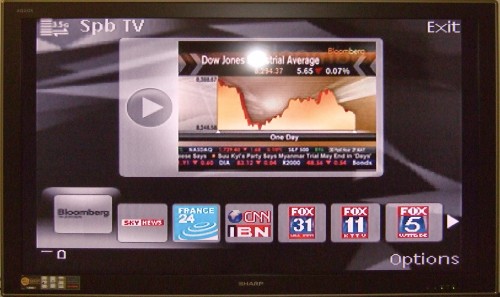
Watch 100+ plus of different channels for free? Freedom to stream high quality video channel on your mobile phone? How does it sound?

OF COS is effing awesome!!! And free I mean no start up cost, no monthly subscription and hazards free!

Channel List with actual preview
Selecting of channel over current channel

SPB TV streams channel through 3G service and also Wifi, so those who want absolutely free, you had to be near a hot spot or router.

First up, I must say that it isn't as great as cable TV or MOB TV. However it doesn't really provide 100 plus channel from across the world. Some of them you might not like, but there is sure some which you might be interested in. Note that this is a symbian version, if you are using Window Mobile or Ipod, you had to find other ways.

What you will need?
A simple general review of the program. Click on e video.


Procedure:
  1. download trial version from the offical website, here
  2. Transfer the .sis file to your phone by cable or card reader
  3. Install the .sis on your phone
  4. Open the application on the phone (under application)
  5. Wait for it to fully load and authorize
  6. Register with the code, here
  7. You have to find the code for SPB TV yourself, I cannot post here
Although, there are limited Asian Channel. But since it is free. There really isn't much to complain about.

N82 "no gateway reply" fix

Sloved my N82 "no gateway reply" error!

After browsing the net for some time Ive found a fix for the "No Gateway reply" message when trying to access the internet!

Its also fix's the BBC iPlayer! (Atleast it did on my phone!)

I dont know if its already been posted?

Ok so here goes!

ENSURE YOUR WIRELESS CONNECTION IS SET TO PRIORITY:1 on your n82

1st) On your phone go to..

menu tools settings connection Wireless Lan Options Advanced Settings

Disable "Automatic Configuration"
& Disable "Power Saving"

2nd) On your phone go to..

menu tools settings connection destinations Internet

On your wireless network Name (PRIORITY:1 obviously i dont know what that may be)

options edit advanced settings IPv4 settings options Change

all the detais can be copied from your computer. To find them on your computer go to Start Run

Type "cmd" in the run box
when you get the command screen type "ipconfig/all" here you will get all the settings.

The settings the phone needs is

1.Phone IP Address (enter your computer IP address, changing the last two digits to a number about five or six higher than than the original IP, for eg if my IP was 123.654.768.34 id put the ip in my phone as 123.654.768.39 to stop IP conflict)

2.Subnet Mask (copy the same code from the computer to your phone, DO NOT CHANGE ANYTHING)

3. Default Gateway (copy the same code from the computer to your phone, DO NOT CHANGE ANYTHING)

4. DNS Address (Usually called "DNS Servers" on your computer! copy the same code from the computer to your phone, DO NOT CHANGE ANYTHING)

ENSURE ALL NUMBERS ARE IN THE CORRECT PLACES BEFORE AND AFTER THE "."

Then exit all, Turn off your phone and turn it back on again! And all should be up and running!!

source

Dictionary word information missing, install word database error

N-series default dictionary database error is caused by using of non-factory memory card, hence the phone is unable to locate the database for the English - Chinese Simplified dictionary.

To reinstall the data base into the new memory card:
  1. Download the database in zip format here
  2. Unzip into your memory card.
Done. You can now open your dictionary.

Alternatively, from your computer, double-click on

[My Computer] and open the [Memory card name] Removable Disk Drive.

Unzip and copy all the files with sub-folders to "\\[Memory card name]\private" folder in your memory card.

p/s: Tested to be working on N82, N95 and N73.

Jailbreaking Ipod 3.0 and above tutorial

Jailbreaking cannot be any easier. I was sourcing for ways to JB my ipod 2.2.1 version but in vain. So I upgrade it to 3.0 and just as I thought I would want to give up the idea of jailbreaking, I came across a hong kong tutorial explained in dummy proof method. I follow on screen instructions, downloaded 2 files and there I go. Jail BROKEN!!!


*Evil Grin* + *Rise Eyebrown*

  • Okie, I will make it really to follow. I jailbreak my ipod version 3.0 by click here. Please follow step by step and you are 30minutes away from true freedom.
  • After you sucessfully jailbreak the ipod touch/ phone. Please optimize and stabling your ipod by following instructions over here.
At this point of time you had jailbroken your ipod. Credit goes to iphone4hk.com


The graphics speak for itself

Okie, you went throught the ordeal and just found out that the whole big deal thing of jailbreaking was just simply an additioing of application "Cydia" on your ipod. I called that there "gate to the eastern paradise". I shall therefore recommend you go straight to download the MUST HAVE app that made jailbreaking all worthwhile.

Sbsetting (most important): a lot of add on plus running wifi during standby
OpenSSH OpenSSL: transfer file as if ipod a hard drive
WInterboard: manage themes and customize your ipod
Clippy: allow copy and paste for version 2.2.1 and below
Backgrounder: allows you to multi tasking
Lock Down: password protect your applications
MXtube: You Tube player with downloading capability
Five Icon Dock
Imobilecinerma: Play flash in your safari
Mplayer: play wide range of video format like rmvb, avi, mp4, 3gp
Categories: sort your applications into folders
Searcher
Vibrus: vibrating feedback when typing
Norotation
Ihome

p/s: Did I mention that you can play full games without paying???